Trusted by teams at leading enterprises & partners


PyFluent is the first Python development platform with built-in column-level lineage, STTM, AI-integrated coding, visual notebooks, automatic documentation, and an advanced execution framework — all in one.
Visual execution · lineage · AI assist — all in one platform
Data pipelines grow in complexity. Notebooks fragment into unmaintainable scripts. Column-level lineage is invisible. Documentation is always out of date.
No one knows which columns came from where. When upstream schemas change, downstream breaks are invisible until production fails.
Reading old notebooks, tracing pandas chains, deciphering variable names — engineers spend more time understanding code than writing it.
Compliance and audit teams can't trace Python code paths. Every regulatory review turns into a multi-week manual exercise.
Documentation is written once, never updated. New team members spend weeks reverse-engineering what a pipeline does and why.
PyFluent's visual notebook environment combines the familiarity of Jupyter with AI assistance, live lineage visualization, and inline STTM generation — all without leaving your flow.
Every cell has an AI co-pilot that understands your full notebook context. Generate transformations, explain complex logic, refactor chains, or detect bugs — inline, without switching tools.
As you write, a live lineage graph updates in real time alongside your notebook. See which datasets feed which outputs and trace every column's origin without running the code first.
Inline table views, schema cards, and distribution charts render directly beneath each cell output. Explore your data visually without writing separate profiling code.
Every cell edit is tracked with diffs. Compare execution results across versions, rollback individual cells, and annotate changes — full Git-level traceability at the cell granularity.
PyFluent analyzes your cell dependency graph and warns when execution order will produce incorrect results. Automatically suggests the correct sequence before you hit Run All.
Export to production Python modules, FastAPI endpoints, Airflow DAGs, or Spark jobs directly from the notebook. PyFluent strips notebook scaffolding and produces clean, typed output.
PyFluent covers the complete lifecycle — analyze, convert, execute, validate, and accelerate with AI — in one integrated platform.
Scan SAS, DataStage, Informatica, Teradata BTEQ, PL/1, and JCL to auto-build a complete inventory. Discover dependencies, macro chains, external calls, data sources, and fan-in/fan-out hot spots. Produce visual lineage and impact maps that guide the entire modernization.

Parser-driven conversion to Python, PySpark, Snowpark, and SQL for Snowflake, Databricks, BigQuery, Redshift, and Fabric. All translations are explainable and auditable — no black boxes.
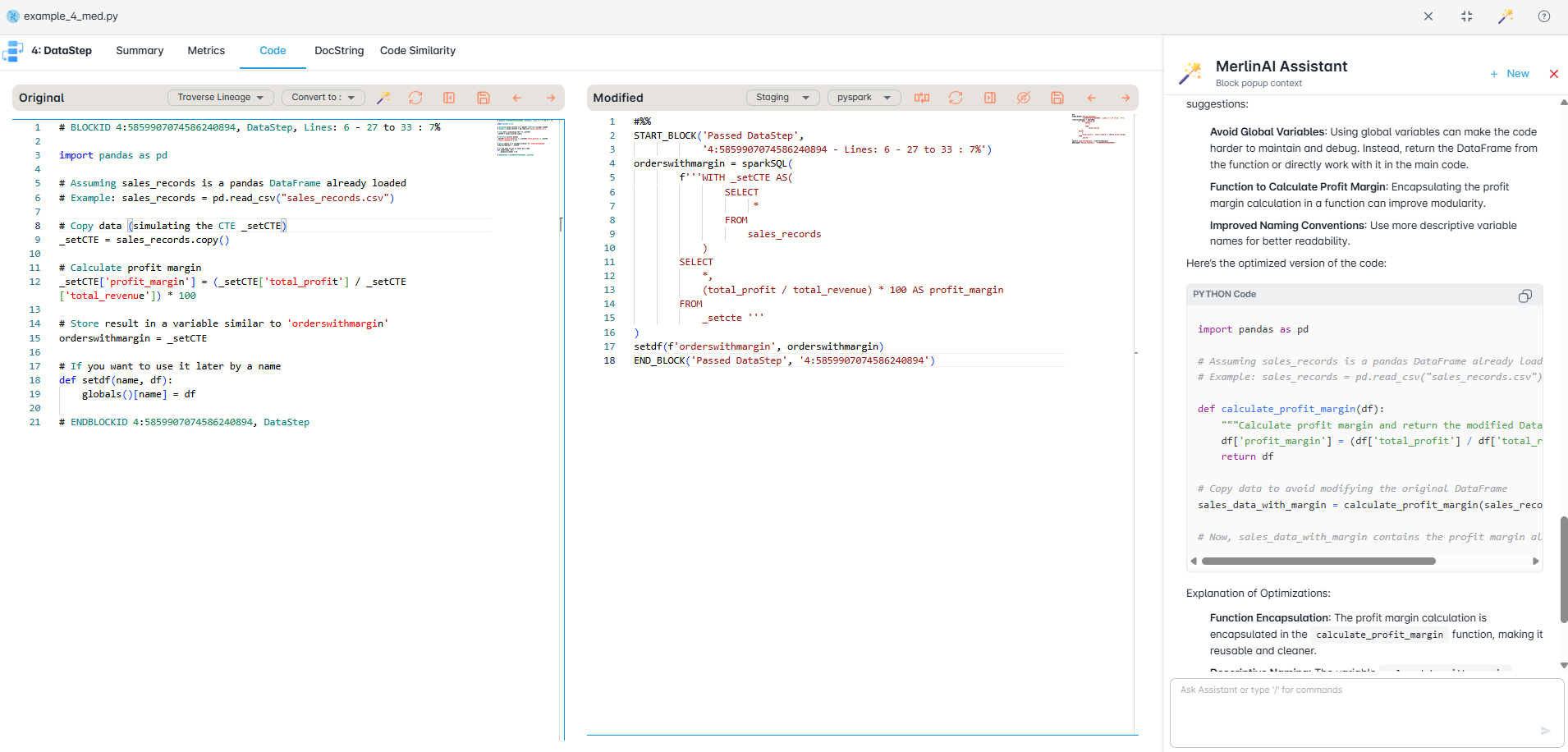
Run converted workloads in the correct order with a driver notebook or job runner. Standardize on Delta and cloud storage, schedule, monitor, and auto-retry — with centralized logs and metrics.

Partitioned validation compares row-level and aggregate outputs between legacy and modern systems. Automatic schema checks, data matching reports, and exception trails give confidence to go live.

Context-aware AI assistance that knows your inventory, lineage, and conversion plans. Generate unit tests, explain diffs, suggest mappings, and draft notebooks with your rules applied — securely inside your environment.

PyFluent instruments your Python pipelines at parse time to extract source-to-target mappings, transformation logic, and dependency graphs — no annotations, no decorators required.
| Source Column | Source Dataset | Transformation | Target Column | Target Dataset | Type |
|---|---|---|---|---|---|
| revenue | sales.parquet | SUM(revenue) | total_revenue | report_final | AGG |
| order_id | sales.parquet | NUNIQUE(order_id) | order_count | report_final | AGG |
| region | sales.parquet | FILTER(region=APAC) | region | report_final | DIRECT |
| product_sku | sales.parquet | JOIN key | product_name | report_final | LOOKUP |
| list_price, units | products.csv, sales.parquet | list_price * units | gross_value | report_final | COMPUTED |
PyFluent parses your Python AST at import time. No decorators, no schema files, no manual mapping — lineage is captured from plain Python code automatically.
Before changing any column, instantly see every downstream function, DataFrame, export, and report it affects. Color-coded risk scores surface breaking changes pre-commit.
Lineage spans across modules, scripts, and notebooks. Import chains, function calls, and dataset handoffs are mapped into a single project-wide dependency graph.
PyFluent generates rich, human-readable documentation from your actual code and lineage metadata. No templates. No manual effort. Always accurate.
def calc_summary(df):
  return (
    df
    .groupby("region")
    .agg({
      "revenue": "sum",
      "order_id": "nunique"
    })
  )
"""
Aggregates sales data by region.

Args:
  df: Sales DataFrame with columns
      revenue (float), order_id (str),
      region (str)

Returns:
  DataFrame — regional summary:
  - total_revenue: SUM(revenue)
  - order_count: NUNIQUE(order_id)

Lineage:
  revenue → total_revenue [AGG]
  order_id → order_count [AGG]
"""
## calc_summary output

| Column        | Type    | Source      |
|---------------|---------|-------------|
| region        | str     | pass-through|
| total_revenue | float64 | SUM(revenue)|
| order_count   | int64   | NUNIQUE(id) |

Quality rules:
- total_revenue >= 0
- order_count > 0
- region IN known_regions
PyFluent's execution framework understands your pipeline's dependency graph and runs it optimally — parallel where possible, sequential where required — across local, Spark, or cloud environments.
PyFluent builds a DAG from your pipeline's data dependencies and executes independent branches in parallel automatically. No Airflow config files. No manual wiring.
Run the same pipeline locally for development, on Spark for scale, or serverless on AWS/GCP/Azure. Target-specific optimizations applied automatically per environment.
Smart checkpointing resumes from the last successful step. Incremental mode processes only new or changed partitions — cutting runtime by up to 80% on large datasets.
PyFluent generates data contract tests from your STTM automatically. Run regression suites that validate column-level transformations against expected outputs without writing a single assert.
Every run produces a flame graph of cell and function execution time, memory peaks, and shuffle costs. Identify bottlenecks in seconds without adding profiling instrumentation.
Schedule notebooks and pipelines directly from PyFluent — cron, event-driven, or API-triggered. No separate orchestration platform required for most enterprise workloads.
Visual execution runs directly on Snowflake and Databricks — combining lineage and live code in one workspace with a direct warehouse session and step-by-step visibility to any failure point.
AutoBot is a production-grade platform for hierarchical PySpark notebook execution with real-time monitoring, dependency safety, performance analytics, and enterprise operations built in.
Organize master and child notebooks with dependency management. Define execution order, handle failures gracefully, and run complex multi-stage PySpark pipelines from a single entry point.
Live execution updates streamed directly to your dashboard via WebSockets. See each notebook's progress, current stage, and failure point the moment it happens — no polling, no refresh.
Capture per-notebook runtime, memory, shuffle, and cost metrics. AutoBot's anomaly detection surfaces regressions and unexpected slowdowns before they impact downstream pipelines.
Track compute cost per notebook run, per pipeline, and per team. Identify the most expensive workloads and right-size your cluster configuration with data-driven recommendations.
Configurable email alerts for failures, completions, and anomalies. Every run is logged with auth context and audit-friendly operation metadata — ready for compliance review.
Native Databricks integration with support for Docker and Kubernetes. Deploy AutoBot in your existing cloud infrastructure with minimal configuration and no vendor lock-in.
Integrates with your existing Databricks workspace, Docker containers, or Kubernetes clusters — capturing execution metrics and anomaly signals from your very first run.
AST-based framework migration, Python and PySpark version upgrades, deep code analysis, and rich HTML reports — all from one toolkit.
Large API surface: DataFrame ops, group-by, joins, strings, datetimes, I/O, windows, resampling. Import rewrites and idiomatic Polars expressions with PEP 8-oriented output and comment preservation.
Shrink operational complexity when local Polars fits your workload. Session and DataFrame patterns, SQL-style functions, joins, windows, aggregations, I/O — UDFs flagged for manual review.
Scale out pandas-style code to distributed Spark. GroupBy, windows, merges, pivots, and filtering — with SparkSession setup and import management handled automatically.
Bring Spark logic back to notebooks and local tests. Reverse mapping for common DataFrame operations. Windows and joins translated toward pandas idioms for fast iteration.
AST-driven upgrades with cumulative rules across versions. Syntax, typing, stdlib deprecations, and library notes — each run writes upgraded Python plus a companion HTML report summarizing what changed, what to watch, and what needs manual review.
Parallel pipeline with its own rules and HTML summary. API modernization across major versions — SQLContext→SparkSession patterns, deprecated or breaking patterns surfaced for review, same reporting style as Python upgrades.
Python's AST preserves structure and semantics — mappings stay maintainable. No fragile regex-only rewrites. Default formatting via isort/autopep8. Comments, import sorting, and structure preserved automatically.
# Python version upgrader
python converters/python_version_upgrader.py your_script.py --from 3.9 --to 3.12 -o out/upgraded.py

# PySpark version upgrader
python converters/pyspark_version_upgrader.py spark_job.py --from 2.4 --to 3.0 -o out/spark_job.py
Writes out/upgraded.html next to the upgraded file. Omit -o to use a default _py312-style suffix next to the input.
PyFlow ships two distinct HTML report types: interactive analysis of visitor logs, and migration summaries for upgrade/converter runs — both first-class outputs.
Run src/run_analyzer.py on an ANTLR visitor log. Parses the log, runs PyFlowAnalyzer, optionally renders Graphviz graphs, and builds a full HTMLReportGenerator page.
python src/run_analyzer.py your_file.log
python src/run_analyzer.py your_file.log --no-graphs
python src/run_analyzer.py your_file.log --offline
Typical outputs: {basename}_analysis.html, {basename}_analysis.json, {basename}_enhanced.py, {basename}_regenerated.py, and graph images (flow, calls, dependencies) as PNG and SVG.
parser → analyzer → report + visualization (Graphviz).The version upgraders and framework converters emit a separate HTML file beside the transformed .py. These pages focus on migration accountability: what was upgraded, what imports moved, deprecations, and explicit manual-review items — not program graphs.
converters/ (pandas ↔ polars, pyspark ↔ polars) emit HTML alongside the new source.testing/examples_python/, testing/examples_pyspark/, and testing/demo_*.html.See a real-world PyFlow Parser output — full code analysis with charts, metrics, call graphs, dependency maps, enhanced code views, and visitor-log-derived summaries generated from an actual codebase.
Command-line tools for batch runs. Programmatic hooks for CI pipelines and custom workflows. Integrate PyFlow Parser directly into your development and migration automation.
Data scientists, engineers, platform owners, and modernization teams. Faster Polars or Spark adoption, less manual rewrite, and clearer reports on every change — from version upgrades to framework migrations.
Six purpose-built modules, each with its own UI and analytics — all sharing a single lineage and metadata graph.

Assess thousands of scripts instantly — map complexity, dependencies, and readiness. Get a prioritized plan, safer cutovers, and faster production go-lives.

Visualize code across jobs, tables, and SQL — sources, flows, and column-level changes. Speeds impact checks, lowers migration risk, and supports compliance audits.

Convert legacy SAS, DataStage, BTEQ, and more into Python, PySpark, Snowpark, or SQL with matched outputs. Modernize faster, keep logic intact.

Automatically map legacy schemas to Snowflake or Databricks with clear, auditable mappings. Enforce naming, data types, and get full audit-ready visibility.

Automatic documentation captures legacy and target code — detailing components, parameters, and dependencies for clear traceability and compliance reporting.

Compare source and target outputs at scale using configurable keys and rules. Flag mismatches, duplicates, and gaps with actionable reports for fast resolution.
From first keystroke to production deployment, PyFluent covers the full development lifecycle.
On-premises deployment, full column-level audit trails, and auto-generated compliance reports ready for your next examination.
No other Python platform combines AI coding assistance, zero-annotation lineage capture, STTM, and automatic documentation in a single on-premise product.
Other tools require decorators, schema registries, or manual lineage annotations. PyFluent captures column-level STTM by parsing your Python AST at import — no code changes, no instrumentation agents.
AI-generated docs are written once and forgotten. PyFluent re-generates documentation every time code changes, using live lineage metadata — so your data dictionary is always accurate, always versioned.
Deploy behind your firewall. No SaaS dependency. No telemetry. Your source code, lineage graphs, and documentation stay in your network — always. One Docker image, up in minutes.
Unlike generic copilots, PyFluent's AI knows your full pipeline lineage when making suggestions. It won't suggest a transformation that would break downstream dependencies — because it can see them.
Drop PyFluent into your existing Python environment. Your first lineage graph renders before your first coffee refill.
Install the PyFluent server, open your first notebook in the PyFluent Studio or VS Code extension. Point it at your existing data sources — S3, Databricks, Snowflake, or local files. Lineage starts capturing immediately.
Review your auto-generated lineage graphs and STTM tables. Generate your first data dictionary and pipeline documentation. Share with your governance team — they'll ask what changed.
Enable data quality rules, configure compliance exports, set up impact analysis alerts. Onboard your full data team — every notebook they open immediately gains lineage and AI assistance.


